
TPL Maps7.3.1 - App Store
You'll be able to see results in few seconds.
Publisher Description

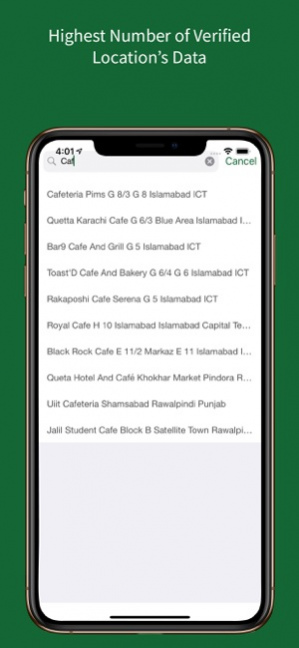

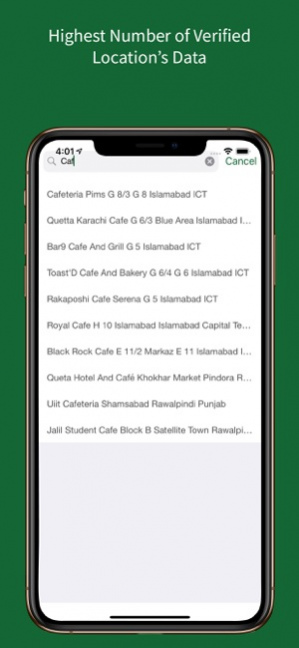
Introducing TPL Maps, Pakistan’s first mobility companion, with over 8 million Points of Interest spanning more than 350 cities nationwide, including millions of businesses, homes, and road networks spanning over 1 million km. Seek real-time updates for your needs, including hospitals, businesses, restaurants, and more.
What's New: Fuel Wise
We understand that managing expenses is important to you, so we've added a Fuel Cost Calculation feature to our app. Now, when planning your routes, you can view the estimated fuel cost for each journey and find the cheapest option to navigate!
Key Features:
. Get real-time estimates of the fuel cost for each route for your selected destination
. Add your vehicle and keep track of how much you have traveled each day
. Discover the most cost-effective route based on our fuel consumption calculations
. Track your trips without selecting a destination, by simply tapping on the background tracking button on our landing screen
Precise Directions: Never take a wrong turn - let TPL Maps be your guide with automatic routing, directions, and road closures. Enjoy accurate turn-by-turn navigation that ensures a safe and sound journey. Location sharing and live tracking: Share your live location with friends and family and experience a worriless journey with peace of mind knowing that your loved ones are just a tap away.
Customizable Stops: Running errands and need to stop at multiple places? Plan your journey by adding personalized stops, whether it’s a must-see attraction or a pit stop for refreshments.
Effortless Trip Planning: Plan your journey seamlessly through advanced recommendations for the ideal route. Enjoy your trip, sit back and relax.
Voice-Guided Navigation: Travelling on a bike or busy while driving? Voice navigation has got your back.
Save your favorite spots: Travelling to your favorite restaurant? With a single tap, we know where to take you.
Multi-Device Sync: Facing difficulty in organizing things handy? Stay organized with your saved and favorite locations across all devices. TPL Maps syncs your saved locations and routes seamlessly.
Keep up with the latest company updates on our Website and Facebook page.
https://www.facebook.com/TPLMaps
https://tplmaps.com/
Your Feedback Matters:
We value your feedback! If you encounter any issues or have suggestions for improvement, please reach out to us at product@tplmaps.com
Thank you for navigating with TPL Maps!
Version History Background Tracking — Add Vehicle:
* Added a missing flow where if the user has not added a vehicle and is attempting to background track their trip; the user will have an option to add a vehicle from the pop-up itself to improve the user experience.
Default Directions - Update Vehicles Details Flow:
* Introduced a new flow which will prompt the users to update & verify their entered details to ensure accuracy of fuel cost calculations. This prompt will be displayed recurrently after a 30-day cycle and the user can also choose to not update the vehicle details.
Default Directions - Incorrect Categorisation:
* Updated the route prioritization to be focused on the estimated cost of the trip instead of the time taken. Where the new logic would allow cheapest routes to be shown first, followed by second cheapest routes.
Start Navigation - Misplaced Beacon:
* Resolved an issue for when a user travels in the fast lane and the beacon moves to the other side of the road, misrepresenting the actual location of the user.
Start Navigation — Start Fuel Tracking CTA:
* Resolved the issue for when the user starts a trip by clicking on start navigation and instead of the top card the user is able to view the start tracking CTA. Additionally the user is unable to view the top card for turn-by-turn navigation 7.3.1 03/20/2024 We are thrilled to announce an exciting feature that will make planning your routes more cost-effective than ever.
• Get real-time estimates of the fuel cost for each route for your selected destination
• Add your vehicle and keep track of how much you have traveled each day
• Discover the most cost-effective route based on our fuel consumption calculations
• Track your trips without selecting a destination, by simply tapping on the background tracking button on our landing screen 7.3.0 02/07/2024 Implemented UI/UX improvements throughout the application for a smoother experience 7.2.6 11/24/2023 Enable users to login using their Apple ID and change their names
Bug fixes and UI improvements 7.2.5 11/08/2023 • Improved consistency with pop-ups and system alerts.
• Added road block alerts to the screen where a user can view alternate routes for their selected destination.
• Added the option to revert back to the original location when a user changes their start point.
• Enhanced the Home/Work location setup process.
• Streamlined the saved feature for a more consistent user experience.
• Reworked the location sharing empty state. 7.2.4 10/26/2023 - Improved user experience by enhancing gesture capabilities.
- Increased clickable areas for easier navigation throughout the application.
- Introduced shimmer effect to replace loading modals on several screens.
- Enhanced dropped pin functionality for smoother map interaction.
- Improved visibility with larger destination icon.
- Added labels to icons for better consistency.
- Revamped Account & Profile settings for a more user-friendly experience. 7.2.3 10/06/2023 We've optimized TPLMaps for an even smoother experience and enhanced the readability of road names, making it a breeze to find your way. Enjoy seamless navigation and quicker response times. 7.2.2 09/19/2023 We're excited to introduce the TPL Maps!
Thank you for being a part of our community and helping us make TPL Maps better with each update! 7.2.1 08/31/2023 We're excited to introduce the TPL Maps!
Thank you for being a part of our community and helping us make TPL Maps better with each update! 7.2 08/31/2023 We're excited to introduce the TPL Maps!
Thank you for being a part of our community and helping us make TPL Maps better with each update! 7.1 08/20/2023 We're excited to introduce the TPL Maps!
Thank you for being a part of our community and helping us make TPL Maps better with each update! 7.0 08/14/2023 * Social login bug fixes
* Minor bug fixes 5.6.2 09/09/2021 Search Bottom sheet UI/UX Improvements
Un-categorized result UI Improvements 5.6.0 03/08/2021 Search Improved. 5.5.1 01/11/2021 New Map Theme - buildings now show the mirrors, previously a glitch
Multiple phone numbers in POI Details in Add a POI, are now allowed
Language selection brought back in Settings
Icons has improved UX for selected POIs
Route Recording UI/UX improvements (with background route recording)
POI icons (including favorites) to have white space to increase the clickable area (clickable area should have improved now)
ADD a POI: Now all categories have somewhat different default timings, with a separate switch for “24 hrs” input
Timeline has been brought in User profile (from the side menu) 5.5.0 11/09/2020 New a theme selectable from the Settings screen
Street Vision has been discontinued.
Location selection behavior has been improved.
Route Overview screen UI has been improved
a. route color is now standard green.
b. Turn list has been shortened by combining similar instructions.
POI Details screen has been improved.
Favorite places UX improvements (selection and editing of Home and Work)
Integrated Apple Sign In 5.4.1 07/31/2020 Drop Pin behaviour has improved in UX
POI Cards are now the same for all screens
While Navigation, POI icons have been removed for a clearer interface
Searching for POIs will give suggestions, even if the results are not matched
App saves user preferences like Live Traffic, Satellite
Search history record should be updated on tapping on a POI, instead of viewing it's details
Navigation screen: Home/Work cards now have the same look as the rest of the cards
Timeline: User timeline will be shown in a separate view for Search, POI Details View, Add Reviews, Navigation.
Urdu language support and maps will now only appear if the system language is Urdu
POI Bottomsheet view has been made static and expandable to fit the content 5.4.0 06/05/2020 Thanks for using TPL Maps! To make out app better for you, we bring updates that includes improvements for speed and reliability. 5.2.4 02/04/2020 Thanks for using TPL Maps! To make out app better for you, we bring updates that includes improvements for speed and reliability. 5.2.2 08/09/2019 minor UX improvements and fixes. 5.2.1 06/11/2019 CleanGreenPakistan
a. User will be able to view their contributions on a map
b. More complaint types
c. Smoother photo upload process (across the app)
Voice Recognition (through a voice input in Search Screen)
Users can now change their passwords within the app
Fullscreen Map (on Main Map Screen)
Multiple Search Results now show grouped into categories
POI Details Screen now show POI Categories
Any recently added POIs (during last 7 days will be highlighted on the Map Screen 5.2.0 05/03/2019 Thanks for using TPLMaps! To make our app better for you, we bring updates that includes improvements for speed and reliability.
Whats new
- Users can now report issues in "Clean & Green Pakistan" feature, by selecting the type of issue e.g. Dumpster, Road Issue etc.
- Performance Improvements
- Minor bug fixes 5.1.2 01/05/2019 Clean and Green Pakistan
Performance Improvements 5.1 12/13/2018 - What3Words Integration within Search
- New Language Selection screen now appears on first startup - Addition
- Improved UX, minor UI changes
- Fixed Google Sign issue on iOS 11 devices
- Improvements and bug fixes 4.8 08/01/2018 - What3Words address in POI Details (New Feature)
- Duplicate place checker when submitting poi data while adding location
- Drop pin related reverse geocoding results improvements
- Performance improvements 4.7 06/05/2018
About TPL Maps
The company that develops TPL Maps is TRG Holdings, LLC. The latest version released by its developer is 7.3.1.
To install TPL Maps on your iOS device, just click the green Continue To App button above to start the installation process. The app is listed on our website since 2026-10-14 and was downloaded 0 times. We have already checked if the download link is safe, however for your own protection we recommend that you scan the downloaded app with your antivirus. Your antivirus may detect the TPL Maps as malware if the download link is broken.
How to install TPL Maps on your iOS device:
- Click on the Continue To App button on our website. This will redirect you to the App Store.
- Once the TPL Maps is shown in the iTunes listing of your iOS device, you can start its download and installation. Tap on the GET button to the right of the app to start downloading it.
- If you are not logged-in the iOS appstore app, you'll be prompted for your your Apple ID and/or password.
- After TPL Maps is downloaded, you'll see an INSTALL button to the right. Tap on it to start the actual installation of the iOS app.
- Once installation is finished you can tap on the OPEN button to start it. Its icon will also be added to your device home screen.
Program Details
System requirements
Download information
Pricing
Version History
version 7.3.1
posted on 2026-10-14
Version History Background Tracking — Add Vehicle:
* Added a missing flow where if the user has not added a vehicle and is attempting to background track their trip; the user will have an option to add a vehicle from the pop-up itself to improve the user experience.
Default Directions - Update Vehicles Details Flow:
* Introduced a new flow which will prompt the users to update & verify their entered details to ensure accuracy of fuel cost calculations. This prompt will be displayed recurrently after a 30-day cycle and the user can also choose to not update the vehicle details.
Default Directions - Incorrect Categorisation:
* Updated the route prioritization to be focused on the estimated cost of the trip instead of the time taken. Where the new logic would allow cheapest routes to be shown first, followed by second cheapest routes.
Start Navigation - Misplaced Beacon:
* Resolved an issue for when a user travels in the fast lane and the beacon moves to the other side of the road, misrepresenting the actual location of the user.
Start Navigation — Start Fuel Tracking CTA:
* Resolved the issue for when the user starts a trip by clicking on start navigation and instead of the top card the user is able to view the start tracking CTA. Additionally the user is unable to view the top card for turn-by-turn navigation 7.3.1 03/20/2024 We are thrilled to announce an exciting feature that will make planning your routes more cost-effective than ever.
• Get real-time estimates of the fuel cost for each route for your selected destination
• Add your vehicle and keep track of how much you have traveled each day
• Discover the most cost-effective route based on our fuel consumption calculations
• Track your trips without selecting a destination, by simply tapping on the background tracking button on our landing screen 7.3.0 02/07/2024 Implemented UI/UX improvements throughout the application for a smoother experience 7.2.6 11/24/2023 Enable users to login using their Apple ID and change their names
Bug fixes and UI improvements 7.2.5 11/08/2023 • Improved consistency with pop-ups and system alerts.
• Added road block alerts to the screen where a user can view alternate routes for their selected destination.
• Added the option to revert back to the original location when a user changes their start point.
• Enhanced the Home/Work location setup process.
• Streamlined the saved feature for a more consistent user experience.
• Reworked the location sharing empty state. 7.2.4 10/26/2023 - Improved user experience by enhancing gesture capabilities.
- Increased clickable areas for easier navigation throughout the application.
- Introduced shimmer effect to replace loading modals on several screens.
- Enhanced dropped pin functionality for smoother map interaction.
- Improved visibility with larger destination icon.
- Added labels to icons for better consistency.
- Revamped Account & Profile settings for a more user-friendly experience. 7.2.3 10/06/2023 We've optimized TPLMaps for an even smoother experience and enhanced the readability of road names, making it a breeze to find your way. Enjoy seamless navigation and quicker response times. 7.2.2 09/19/2023 We're excited to introduce the TPL Maps!
Thank you for being a part of our community and helping us make TPL Maps better with each update! 7.2.1 08/31/2023 We're excited to introduce the TPL Maps!
Thank you for being a part of our community and helping us make TPL Maps better with each update! 7.2 08/31/2023 We're excited to introduce the TPL Maps!
Thank you for being a part of our community and helping us make TPL Maps better with each update! 7.1 08/20/2023 We're excited to introduce the TPL Maps!
Thank you for being a part of our community and helping us make TPL Maps better with each update! 7.0 08/14/2023 * Social login bug fixes
* Minor bug fixes 5.6.2 09/09/2021 Search Bottom sheet UI/UX Improvements
Un-categorized result UI Improvements 5.6.0 03/08/2021 Search Improved. 5.5.1 01/11/2021 New Map Theme - buildings now show the mirrors, previously a glitch
Multiple phone numbers in POI Details in Add a POI, are now allowed
Language selection brought back in Settings
Icons has improved UX for selected POIs
Route Recording UI/UX improvements (with background route recording)
POI icons (including favorites) to have white space to increase the clickable area (clickable area should have improved now)
ADD a POI: Now all categories have somewhat different default timings, with a separate switch for “24 hrs” input
Timeline has been brought in User profile (from the side menu) 5.5.0 11/09/2020 New a theme selectable from the Settings screen
Street Vision has been discontinued.
Location selection behavior has been improved.
Route Overview screen UI has been improved
a. route color is now standard green.
b. Turn list has been shortened by combining similar instructions.
POI Details screen has been improved.
Favorite places UX improvements (selection and editing of Home and Work)
Integrated Apple Sign In 5.4.1 07/31/2020 Drop Pin behaviour has improved in UX
POI Cards are now the same for all screens
While Navigation, POI icons have been removed for a clearer interface
Searching for POIs will give suggestions, even if the results are not matched
App saves user preferences like Live Traffic, Satellite
Search history record should be updated on tapping on a POI, instead of viewing it's details
Navigation screen: Home/Work cards now have the same look as the rest of the cards
Timeline: User timeline will be shown in a separate view for Search, POI Details View, Add Reviews, Navigation.
Urdu language support and maps will now only appear if the system language is Urdu
POI Bottomsheet view has been made static and expandable to fit the content 5.4.0 06/05/2020 Thanks for using TPL Maps! To make out app better for you, we bring updates that includes improvements for speed and reliability. 5.2.4 02/04/2020 Thanks for using TPL Maps! To make out app better for you, we bring updates that includes improvements for speed and reliability. 5.2.2 08/09/2019 minor UX improvements and fixes. 5.2.1 06/11/2019 CleanGreenPakistan
a. User will be able to view their contributions on a map
b. More complaint types
c. Smoother photo upload process (across the app)
Voice Recognition (through a voice input in Search Screen)
Users can now change their passwords within the app
Fullscreen Map (on Main Map Screen)
Multiple Search Results now show grouped into categories
POI Details Screen now show POI Categories
Any recently added POIs (during last 7 days will be highlighted on the Map Screen 5.2.0 05/03/2019 Thanks for using TPLMaps! To make our app better for you, we bring updates that includes improvements for speed and reliability.
Whats new
- Users can now report issues in "Clean & Green Pakistan" feature, by selecting the type of issue e.g. Dumpster, Road Issue etc.
- Performance Improvements
- Minor bug fixes 5.1.2 01/05/2019 Clean and Green Pakistan
Performance Improvements 5.1 12/13/2018 - What3Words Integration within Search
- New Language Selection screen now appears on first startup - Addition
- Improved UX, minor UI changes
- Fixed Google Sign issue on iOS 11 devices
- Improvements and bug fixes 4.8 08/01/2018 - What3Words address in POI Details (New Feature)
- Duplicate place checker when submitting poi data while adding location
- Drop pin related reverse geocoding results improvements
- Performance improvements 4.7 06/05/2018
version 7.3.1
posted on 2024-03-20
Mar 20, 2024
Version 7.3.1
Background Tracking — Add Vehicle:
* Added a missing flow where if the user has not added a vehicle and is attempting to background track their trip; the user will have an option to add a vehicle from the pop-up itself to improve the user experience.
Default Directions - Update Vehicles Details Flow:
* Introduced a new flow which will prompt the users to update & verify their entered details to ensure accuracy of fuel cost calculations. This prompt will be displayed recurrently after a 30-day cycle and the user can also choose to not update the vehicle details.
Default Directions - Incorrect Categorisation:
* Updated the route prioritization to be focused on the estimated cost of the trip instead of the time taken. Where the new logic would allow cheapest routes to be shown first, followed by second cheapest routes.
Start Navigation - Misplaced Beacon:
* Resolved an issue for when a user travels in the fast lane and the beacon moves to the other side of the road, misrepresenting the actual location of the user.
Start Navigation — Start Fuel Tracking CTA:
* Resolved the issue for when the user starts a trip by clicking on start navigation and instead of the top card the user is able to view the start tracking CTA. Additionally the user is unable to view the top card for turn-by-turn navigation
version 7.3.1
posted on 2024-03-20
Background Tracking — Add Vehicle:
* Added a missing flow where if the user has not added a vehicle and is attempting to background track their trip; the user will have an option to add a vehicle from the pop-up itself to improve the user experience.
Default Directions - Update Vehicles Details Flow:
* Introduced a new flow which will prompt the users to update & verify their entered details to ensure accuracy of fuel cost calculations. This prompt will be displayed recurrently after a 30-day cycle and the user can also choose to not update the vehicle details.
Default Directions - Incorrect Categorisation:
* Updated the route prioritization to be focused on the estimated cost of the trip instead of the time taken. Where the new logic would allow cheapest routes to be shown first, followed by second cheapest routes.
Start Navigation - Misplaced Beacon:
* Resolved an issue for when a user travels in the fast lane and the beacon moves to the other side of the road, misrepresenting the actual location of the user.
Start Navigation — Start Fuel Tracking CTA:
* Resolved the issue for when the user starts a trip by clicking on start navigation and instead of the top card the user is able to view the start tracking CTA. Additionally the user is unable to view the top card for turn-by-turn navigation
version 5.6.2
posted on 2021-09-09
Sep 9, 2021 Version 5.6.2
* Social login bug fixes
* Minor bug fixes
version 5.6.0
posted on 2021-03-08
8 Mar 2021 Version 5.6.0
Search Bottom sheet UI/UX Improvements
Un-categorized result UI Improvements
version 5.6.0
posted on 2021-03-08
Mar 8, 2021 Version 5.6.0
Search Bottom sheet UI/UX Improvements
Un-categorized result UI Improvements
version 5.5.1
posted on 2021-01-11
Jan 11, 2021 Version 5.5.1
Search Improved.
version 5.5.0
posted on 2020-11-09
Nov 9, 2020 Version 5.5.0
New Map Theme - buildings now show the mirrors, previously a glitch
Multiple phone numbers in POI Details in Add a POI, are now allowed
Language selection brought back in Settings
Icons has improved UX for selected POIs
Route Recording UI/UX improvements (with background route recording)
POI icons (including favorites) to have white space to increase the clickable area (clickable area should have improved now)
ADD a POI: Now all categories have somewhat different default timings, with a separate switch for “24 hrs” input
Timeline has been brought in User profile (from the side menu)
version 5.4.1
posted on 2020-07-31
Jul 31, 2020 Version 5.4.1
New a theme selectable from the Settings screen
Street Vision has been discontinued.
Location selection behavior has been improved.
Route Overview screen UI has been improved
a. route color is now standard green.
b. Turn list has been shortened by combining similar instructions.
POI Details screen has been improved.
Favorite places UX improvements (selection and editing of Home and Work)
Integrated Apple Sign In
version 5.4.0
posted on 2020-06-05
Jun 5, 2020 Version 5.4.0
Drop Pin behaviour has improved in UX
POI Cards are now the same for all screens
While Navigation, POI icons have been removed for a clearer interface
Searching for POIs will give suggestions, even if the results are not matched
App saves user preferences like Live Traffic, Satellite
Search history record should be updated on tapping on a POI, instead of viewing it's details
Navigation screen: Home/Work cards now have the same look as the rest of the cards
Timeline: User timeline will be shown in a separate view for Search, POI Details View, Add Reviews, Navigation.
Urdu language support and maps will now only appear if the system language is Urdu
POI Bottomsheet view has been made static and expandable to fit the content
Disclaimer
Official App Store Link
We do not host TPL Maps on our servers. We did not scan it for viruses, adware, spyware or other type of malware. This app is hosted by Apple and passed their terms and conditions to be listed there. We recommend caution when installing it.
The App Store link for TPL Maps is provided to you by apps112.com without any warranties, representations or guarantees of any kind, so access it at your own risk.
If you have questions regarding this particular app contact the publisher directly. For questions about the functionalities of apps112.com contact us.
